Flexible columns + automations
Let teams shape their own workflow.
A new home for everyday work. I designed connected spaces, flexible boards, and record-aware Docs—with AI as a foundational design direction from the beginning.
Most work isn’t a formal project. Launches, onboarding, team planning, and the daily follow-through were happening in lightweight tools outside ServiceNow. The opportunity was to make that work feel easy without losing its connection to the enterprise.
I was the first designer on CWM, working with a VP of Product and a Senior Product Owner to shape a new product from the ground up. My focus was the experience and the relationships underneath it: how people, teams, documents, and work stay connected.
I reviewed 12 tools through four lenses: capabilities, usability, public reviews, and customer needs. The useful question wasn’t how to copy their feature lists. It was what made people feel capable of shaping their own work.
Let teams shape their own workflow.
Give work structure without making every change an admin request.
Connect everyday progress to a bigger picture.
Make context part of the work.
Make the next action easy to see.
Offer useful flexibility without an overwhelming starting point.
Design takeaways reconstructed from my original portfolio analysis, not a current feature ranking. The 12-tool review also included Salesforce, Smartsheet, and Microsoft Loop.
Today, monday combines boards, docs, and AI assistance; Jira emphasizes work visibility through boards and timelines; Wrike combines planning, execution, and AI creation tools. CWM’s opportunity is to make daily collaboration feel natural within the ServiceNow environment customers already use.
Current public product context · September 2026We wrote a future-customer thank-you letter to describe the outcome before committing to features. It gave the team a shared test: does this decision make work easier, lighter, and more connected?
A team should be able to create a space and shape its work.
A kickoff doc should stay connected to the work it explains.
A team board should connect to records, goals, and portfolio planning.
People · ownership · access
Tasks · owners · status
Intent · decisions · records
Product model / reconstructed to explain the design, rather than an original workshop artifact.
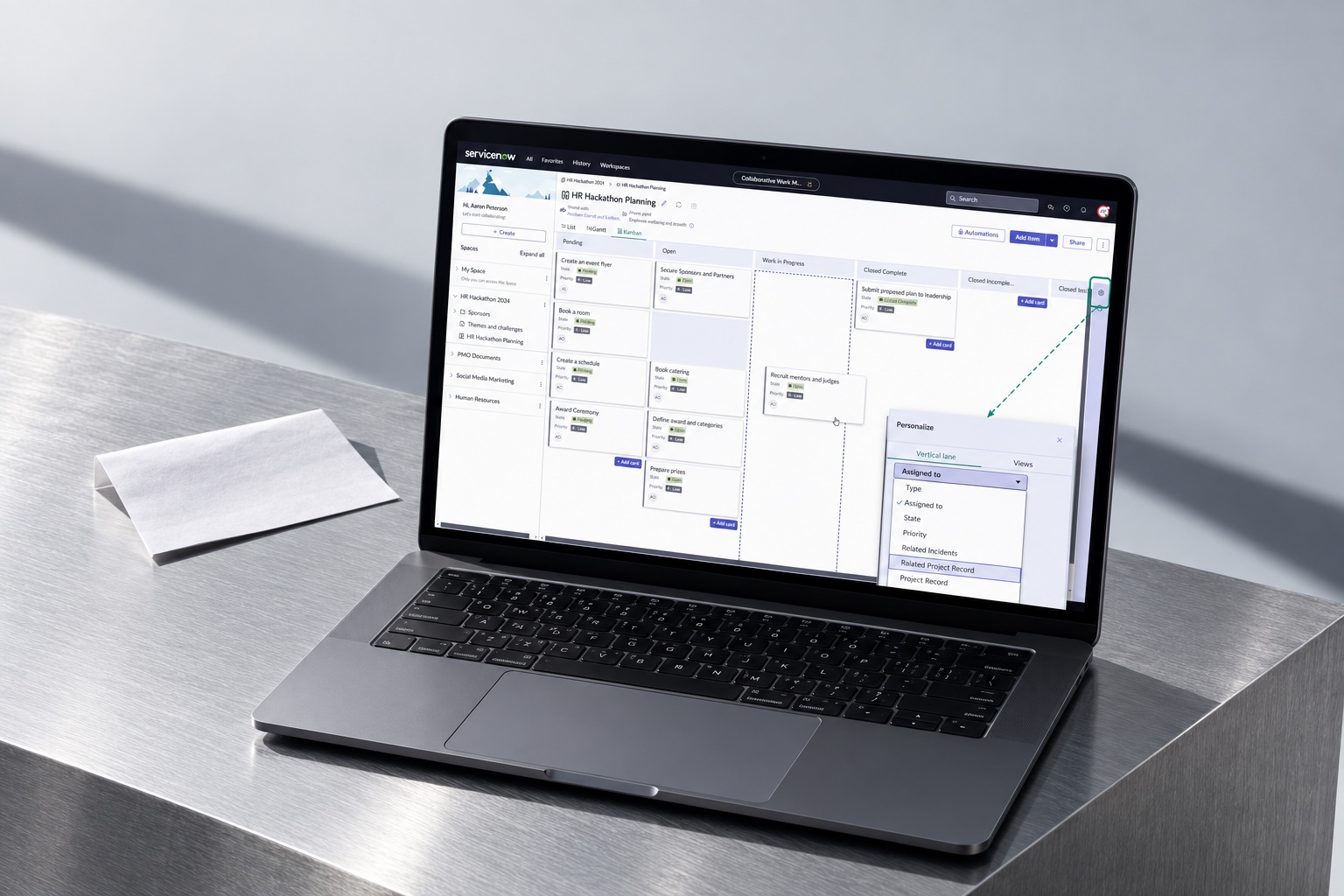
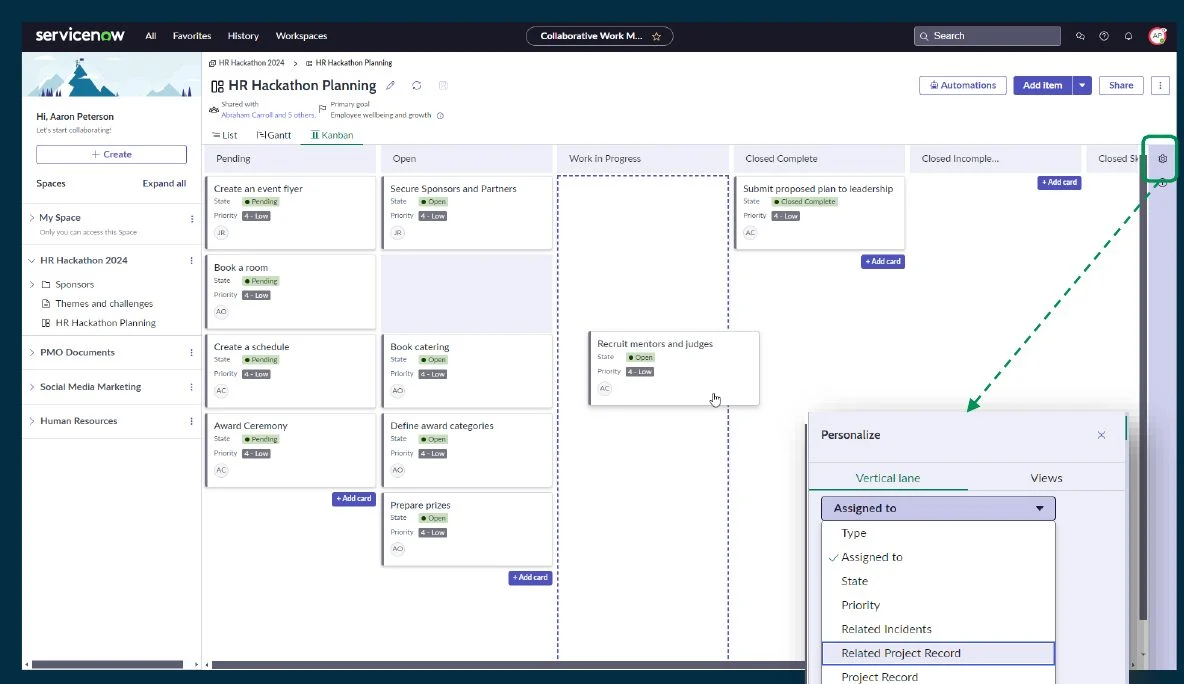
I designed boards around a shared dataset with multiple perspectives. Lists support precise edits. Kanban makes flow visible. Gantt makes dates and dependencies easier to discuss. Teams can change their perspective without rebuilding the work.
Custom columns and work types give teams room to fit their workflow.
People, status, and timing stay attached to the item.
No-code automations support repeatable work.
I created the Docs component to give ServiceNow a modern place to think and collaborate: block-based writing, templates, rich media, slash commands, and mentions of people and platform records. The important part was the connection. A document could carry the work’s context without becoming another isolated file.
Keep the plan and its source of truth together.
Decision: connect the next milestone to the delivery plan.
The slash menu makes powerful actions discoverable at the point of intent. Record references keep the conversation grounded in the platform.
Interaction illustration · sample contentThe component went beyond CWM, including use in Project Workspace. Designing it as a platform capability made the value larger than one product.
“Better together” meant working across SPM applications from a central place. A team could organize its day in CWM while bringing in the records and strategic context that already existed elsewhere.
Spaces · Boards · Docs
Relationship map / bringing team work and enterprise context into one experience.
Public documentation describes connecting CWM with Strategic Planning and configuring the platform records available in Docs. Read ServiceNow’s configuration guide.
This was my design conviction from the beginning, before AI became a central leadership conversation: collaboration software should help people move work forward. I wanted the foundation to support intelligence, rather than treating AI as an extra surface added later.
Design rationale / the foundation and later AI explorations are distinct phases.
Later prototypes explored meeting actions, capacity, and risks: capture context, propose the work, and give the person a clear opportunity to review. The ambition was assistance inside the workflow.
See the original portfolio walkthrough, then explore ServiceNow’s public product demonstration for a broader view of boards, Docs, and planning connections.
 SERVICENOW DOCUMENTATIONSee the product in motion.Watch the official overview
Public ServiceNow demonstration · recorded in Xanadu, published March 2026. Product context, separate from my original design artifacts. Watch on YouTube.
Spaces, boards, Docs, automations, and connections to strategy formed the first release.
The component traveled into other ServiceNow experiences, including Project Workspace.
Connected people, context, and work create a stronger starting point for useful AI.
My contribution was making enterprise work feel approachable without stripping away its meaning. A useful board is more than a set of cards. A useful doc is more than a page. Together, they can become a place a team wants to work.